Bienvenido a Open Games Community

Únete ahora para acceder a todas nuestras funciones. Una vez que te registres e inicies sesión, podrás crear temas, responder a hilos existentes, valorar la reputación de otros miembros y muchísimo más. Además, es rápido y totalmente gratuito; ¿a qué esperas?

Tutorial 🔰Abrir el Mapa OtservBR con RME ( Remeres Map Editor )

Alex

Administrador
Dev
Registrado
1 Sep 2021
Mensajes
2.376
Puntuación de reacción
28.613
Puntos
707
Hola a todos,

En el foro esta disponibles 2 Versiones de Remeres map editor, la ultima, 3.7.0 No Soporta la versión del RME.

Por lo tanto para poder abrir el mapa de Otservbr deberéis de seguir estos pasos:


Descargar el RME 3.6.0 Aquí:

Descargar el Cliente Tibia 12.64 Aquí:

Descargar el SpiderConverter Aquí:

Una vez hecho, vamos a descomprimir todo en el escritorio.
Abriremos el SpiderConverter, vamos en la primera linea a seleccionar la carpeta Assets del cliente tibia 12.64
En la segunda linea, nos pedirá en donde queremos extraer los archivos ( vamos a crear una carpeta en el escritorio llamada SPR ) y seleccionaremos esta carpeta.

Luego, pulsaremos en .SPR ( no client slices sheets ni sprites ) y a la izquierda en Export Sprites. Lo dejaremos cargar.
Una vez terminado pulsaremos en Export Dat.
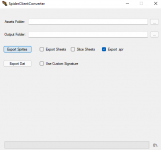
1.png

Una vez terminado en la carpeta SPR, encontraremos dentro una carpeta llamada Clients y dentro el SPR y DAT. Copiamos la carpeta Clients dentro de la carpeta del Remeres map editor.


Abriremos el Remeres map editor x64, abrira una pantalla con 3 botones, New, Open, Preferences, pulsaremos en Preferences, abajo del todo en la ultima linea 1261, le daremos la ubicación de la carpeta Clients dentro del RME. Guardaremos y nos iremos en OPEN.
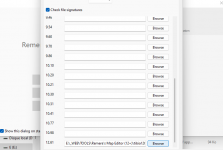
2.png

Seleccionamos el mapa dentro del servidor data/world/otservbr.otbm y se cargara el mapa.
 
J

JockeOT

Invitado
Hey
How do you get the 12.61 version? I have a 12.72 server and all i find in RME 3 is client 11. How do i add 12.72?
I follow your guide but i still only have client 11.
//Jocke
 

Adjuntos

  • gahgadh.png
    gahgadh.png
    1,9 MB · Visitas: 22

Alex

Administrador
Dev
Registrado
1 Sep 2021
Mensajes
2.376
Puntuación de reacción
28.613
Puntos
707
Hey
How do you get the 12.61 version? I have a 12.72 server and all i find in RME 3 is client 11. How do i add 12.72?
I follow your guide but i still only have client 11.
//Jocke
Hello,

First of all, it depends the world you want to open, 12.72-12.86 with last rme, and before with previous version, there is 2 version of rme on forum.
Also sometimes check %appdata% local / temp, and delete the files inside of temp , because it saves infirmation and you can get errors on some maps.
 
J

JockeOT

Invitado
Hello,
I want to open 12.72 world from your 12x "Otservbr1537" and edit the map.
So i guess i need RME 3.7.0? But when i open i only have "client 11".

How i do it :
1. I open the Otservbr1537\data\world\otservbr.otbm with "remeres-map-editor-12x" Error with sprites file and meta files appear as normal.
2. With spider converter i take the asset from forum "client-1264-master" version and put it in a new spr map.
3. Then i select the spr\client folder in RME and the map starts to load. But when its finished the map looks all wierd and when i go to i can only find client 11.
What am I missing out?

I also did try the RME 2.6.1 version but it only goes to 7.4 version to 10.1. And i need 12.72 version.
 
J

JockeOT

Invitado
Btw i have tried with "client-12.72.11206-12.72.11206" also.
 

Alex

Administrador
Dev
Registrado
1 Sep 2021
Mensajes
2.376
Puntuación de reacción
28.613
Puntos
707
Btw i have tried with "client-12.72.11206-12.72.11206" also.
Yes,
With this one,

Extract Assets folder with spiderconverter from your client 12.72, then on preferences RME set up on 12.61 line, the "Clients" folder, where is in reality extracted from spider converter the .spr & .dat.

If you didnt have the 12.61 line, try download this one,


Each time you add a new item on your server you can add it on our map, extracting again the spr & dat from our assets.
 
J

JockeOT

Invitado
Hey,
Fixed! Thank you.
The problem was the map editor, seems like the 3.7.0 only works for client 11?
With hellgrave map i found 12.61 and i could open 12.72 with it without any problems.
Thankyou, now i only need to find a guide how to make quests chest in RMA ^^
 

Alex

Administrador
Dev
Registrado
1 Sep 2021
Mensajes
2.376
Puntuación de reacción
28.613
Puntos
707
Hey,
Fixed! Thank you.
The problem was the map editor, seems like the 3.7.0 only works for client 11?
With hellgrave map i found 12.61 and i could open 12.72 with it without any problems.
Thankyou, now i only need to find a guide how to make quests chest in RMA ^^
Really easy, action id 2000, and on unique id add a number aleatory like 24677, insert on blacksquares thé items then open pour server, open chest then it would be unique chest.
 
J

JockeOT

Invitado
Im still trying but i cant figure it out.
Can you paste a lua text file here on 1 quest so i have something to go from? Do i put the lua file in Otservbr1537\data\scripts\actions\quests ?
I want to make a chest so when i loot it i get 2 cc, and i can only do it once, like a quest chest.
 
J

JockeOT

Invitado
You are a hero, i made it. That was easy :D Thanks again!
 

Alex

Administrador
Dev
Registrado
1 Sep 2021
Mensajes
2.376
Puntuación de reacción
28.613
Puntos
707
You are a hero, i made it. That was easy :D Thanks again!
Yeah, thats not needed a lua file, but you can do It,
Take an example of the vocation_reward.lua, is the file about rewards chests on dawnport for each vocation.
 

mrc1333

Miembro
Registrado
23 Mar 2023
Mensajes
10
Puntuación de reacción
2
Puntos
128
Ubicación
Polska
hello, I added items to the client and to the engine, now I'm trying to add these items to the editor maps but I can't figure out how to create a new items.otb file?? I have generated new dat/spr but when I load it the items are not in the editor??
 

Alex

Administrador
Dev
Registrado
1 Sep 2021
Mensajes
2.376
Puntuación de reacción
28.613
Puntos
707
hello, I added items to the client and to the engine, now I'm trying to add these items to the editor maps but I can't figure out how to create a new items.otb file?? I have generated new dat/spr but when I load it the items are not in the editor??
Hi
After generate dat spr you need download an item editor , mark preference for the spr/dat folder you made. Open item.otb on the editor , click tools create missing items , wait , save and open remeres map editor.
 

mrc1333

Miembro
Registrado
23 Mar 2023
Mensajes
10
Puntuación de reacción
2
Puntos
128
Ubicación
Polska
1728998198302.png after setting the preferences, where are the dat/spr located, do I have something like this?
 

Alex

Administrador
Dev
Registrado
1 Sep 2021
Mensajes
2.376
Puntuación de reacción
28.613
Puntos
707
Ver archivo adjunto 5080 after setting the preferences, where are the dat/spr located, do I have something like this?
mm seems that isn't the correct one, strange, theorically the versions are supported, is for item editor right ?
Did you open item editor by the program and not clicking on items.otb (because will not work correctly )
 

mrc1333

Miembro
Registrado
23 Mar 2023
Mensajes
10
Puntuación de reacción
2
Puntos
128
Ubicación
Polska
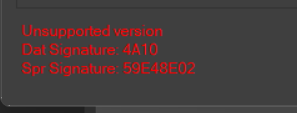
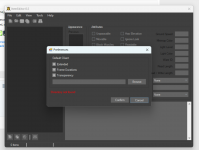
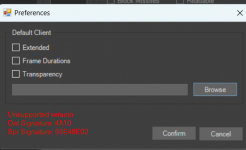
I run the item editor and go straight to preferences and set the folder with dat/spr and then I get this message in red
 

Adjuntos

  • 1729094075138.png
    1729094075138.png
    97,6 KB · Visitas: 3
  • 1729094318848.png
    1729094318848.png
    34,6 KB · Visitas: 4

Alex

Administrador
Dev
Registrado
1 Sep 2021
Mensajes
2.376
Puntuación de reacción
28.613
Puntos
707
I run the item editor and go straight to preferences and set the folder with dat/spr and then I get this message in red
So try find on ethernet another item editor that supports this version
 

mrc1333

Miembro
Registrado
23 Mar 2023
Mensajes
10
Puntuación de reacción
2
Puntos
128
Ubicación
Polska
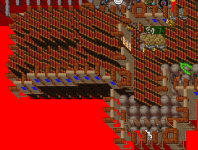
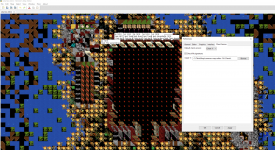
1729258059010.pngI managed to do it partially, but when I create the items.otb file and replace it with rem, the map looks like in the picture, I noticed that if all items were moved by 1id, i.e. if something had id123, then after updating items.otb this item has id124 ^^
 
B

Bichologo4k

Invitado
Hola, hice todo lo que decias, pero aun asi no me abre el real map 8.6. en la ultima parte donde pones la imagen de preferencias para elegir el cliente, solo me da la opcion de cliente 11. luego abro el archivo del mapa, carga algunas cosas y luego queda todo en negro y no se ve el mapa.
 

Alex

Administrador
Dev
Registrado
1 Sep 2021
Mensajes
2.376
Puntuación de reacción
28.613
Puntos
707
Hola, hice todo lo que decias, pero aun asi no me abre el real map 8.6. en la ultima parte donde pones la imagen de preferencias para elegir el cliente, solo me da la opcion de cliente 11. luego abro el archivo del mapa, carga algunas cosas y luego queda todo en negro y no se ve el mapa.
No te olvides cuando sale negro aprietas ctrl+t para ver las towns e ir hacia una Town !
 
shape1
shape2
shape3
shape4
shape5
shape6
Arriba