Bienvenido a Open Games Community

Únete ahora para acceder a todas nuestras funciones. Una vez que te registres e inicies sesión, podrás crear temas, responder a hilos existentes, valorar la reputación de otros miembros y muchísimo más. Además, es rápido y totalmente gratuito; ¿a qué esperas?
Dofus EMU 2.51 Populus

DataPack Dofus EMU 2.51 Populus v1.0.0

Sin permiso para descargar
B

bammbino

Invitado
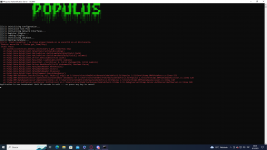
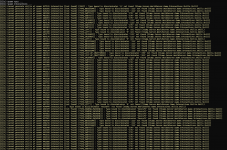
Buenas, me sale este error cuando quiero ejecutar el Start_AUTH.bat
 

Adjuntos

  • error.png
    error.png
    76,8 KB · Visitas: 51

Alex

Administrador
Dev
Registrado
1 Sep 2021
Mensajes
2.362
Puntuación de reacción
28.646
Puntos
707
Buenas, me sale este error cuando quiero ejecutar el Start_AUTH.bat
Hola,

La primera linea lo indica todo, no tienes el .NET Framework instalado en tu ordenador.
Los que yo tengo instalados:
  • .NET Core Runetime 3.1.19
  • .NET Framework 4.6.1 SDK + Targetin Pack + Targetin Pack (ENU)
También instala .NET 3.5
 
B

bammbino

Invitado
La cosa es que si tenia el .NET Framework 3.5 y 4.8 advances services, por las dudas instale los que me dijiste y sigue el problema.:cry:
 

Alex

Administrador
Dev
Registrado
1 Sep 2021
Mensajes
2.362
Puntuación de reacción
28.646
Puntos
707
La cosa es que si tenia el .NET Framework 3.5 y 4.8 advances services, por las dudas instale los que me dijiste y sigue el problema.:cry:
Hoy por la tarde si estás en discord, descarga anydesk y te lo miro
 
B

bammbino

Invitado
Listo, si tienes un momento perfecto, sino no hay problema :)
 

Oscar200128

Miembro
Registrado
8 Mar 2023
Mensajes
7
Puntuación de reacción
4
Puntos
125
Ubicación
Chile
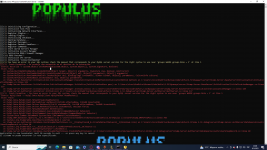
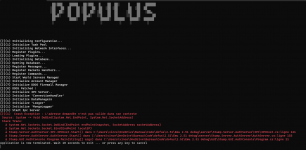
Buenas , a mi me sale el siguiente error , al abrir el start_auth.bat . De antemano muchas gracias por tu respuesta.
 

Adjuntos

  • imagen_2023-03-08_004105822.png
    imagen_2023-03-08_004105822.png
    115 KB · Visitas: 43

Oscar200128

Miembro
Registrado
8 Mar 2023
Mensajes
7
Puntuación de reacción
4
Puntos
125
Ubicación
Chile
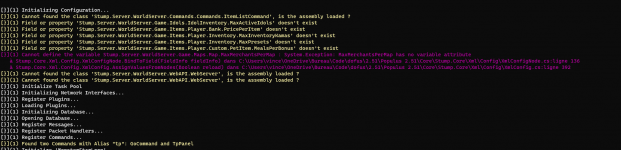
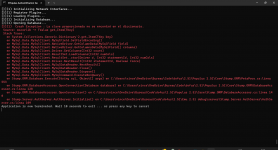
Buenas pude avanzar de ahi pero , ahora otro error es
 

Adjuntos

  • imagen_2023-03-08_230710462.png
    imagen_2023-03-08_230710462.png
    178,2 KB · Visitas: 34

Alex

Administrador
Dev
Registrado
1 Sep 2021
Mensajes
2.362
Puntuación de reacción
28.646
Puntos
707
Hello,
I would like to know if you find a way to fix this error.
I am stuck on this one and I don't have any idea on how to fix it.. :/
Do you have everything opened and the Mysql also ? Is every config right wrotted , Java installed ?
 
D

Drakestes

Invitado
Do you have everything opened and the Mysql also ? Is every config right wrotted , Java installed ?
Hi Alex,
Thank you for your response.
I have found the problem, it was in my wammp installation, i had not installed the right mysql version, I had version 8 instead of 5.
But I have another question, if you don't mind.

In the configuration process, in the world config file, we have to edit the ./plugins to add our path.
I changed it to tell him where the files where, but I always have an error saying that ./plugins is invalid.

This is the default one on the file:
<Plugins>
<PluginManager>
<!--Editable as Running : True-->
<Variable name="PluginsPath" serialized="true">
<ArrayOfString xmlns:xsi="http://www.w3.org/2001/XMLSchema-instance" xmlns:xsd="http://www.w3.org/2001/XMLSchema">
<string>./plugins/</string>
</ArrayOfString>
</Variable>
</PluginManager>
</Plugins>

I tried to edit this line:
<string>./plugins/</string>

To something like that:
<string>C/users/%username%/desktop/emu_2.51_debug/server/Stump.Server.BaseServer/plugins/</string>

Of course the %username% was replace with my actual username.
I also tried the following:
<string>C:/users/%username%/desktop/emu_2.51_debug/server/Stump.Server.BaseServer/plugins/</string>
<string>C:\users\%username%\desktop\emu_2.51_debug\server\Stump.Server.BaseServer\plugins\</string>
<string>C\users\%username%\desktop\emu_2.51_debug\server\Stump.Server.BaseServer\plugins\</string>

But nothing worked, it still say that ./plugins led to an invalid location.

 
J

jazy

Invitado
hola, solo veo la la descarga del cleinte, donde esta la de server? porque en cliente no estan los sql, gracias
 
D

Drakestes

Invitado
Hi Alex,
Thank you for your response.
I have found the problem, it was in my wammp installation, i had not installed the right mysql version, I had version 8 instead of 5.
But I have another question, if you don't mind.

In the configuration process, in the world config file, we have to edit the ./plugins to add our path.
I changed it to tell him where the files where, but I always have an error saying that ./plugins is invalid.

This is the default one on the file:
<Plugins>
<PluginManager>
<!--Editable as Running : True-->
<Variable name="PluginsPath" serialized="true">
<ArrayOfString xmlns:xsi="http://www.w3.org/2001/XMLSchema-instance" xmlns:xsd="http://www.w3.org/2001/XMLSchema">
<string>./plugins/</string>
</ArrayOfString>
</Variable>
</PluginManager>
</Plugins>

I tried to edit this line:
<string>./plugins/</string>

To something like that:
<string>C/users/%username%/desktop/emu_2.51_debug/server/Stump.Server.BaseServer/plugins/</string>

Of course the %username% was replace with my actual username.
I also tried the following:
<string>C:/users/%username%/desktop/emu_2.51_debug/server/Stump.Server.BaseServer/plugins/</string>
<string>C:\users\%username%\desktop\emu_2.51_debug\server\Stump.Server.BaseServer\plugins\</string>
<string>C\users\%username%\desktop\emu_2.51_debug\server\Stump.Server.BaseServer\plugins\</string>

But nothing worked, it still say that ./plugins led to an invalid location.
I have found how to fix this. (i had edited the line on the world config file only, now that I have changed it on both it works well. :)

Now the game seems to work fine on my local computer.
But, when I launch the game, I have the following error:
1692667553427.png
I have searched for the files and they seems to be in the right place.
I only have the webapi.webserver that is missing.


1692667581314.png
For this one, I have a large number of error all with "(Stump.Server.WorldServer.Game.Interactives.Skills.Skill)".
This file is right at the location that I can see on the error.

So for these error I really don't know what is going on, since everything seems to be there.


Also, I was wondering, wich line I have to edit to add my hamachi ip to be able to play with my friend?
Everytime I try to edit the ip address I always end with an error saying that my ip is not valid.
Like this one:
1692667971674.png


Thank you and have a great day!
 
T

teteu544

Invitado
Hello , have the Lang? because i need to edit de NPC and add to edit, if i spawn a NPC after restart the npc was deleted.
 

Alex

Administrador
Dev
Registrado
1 Sep 2021
Mensajes
2.362
Puntuación de reacción
28.646
Puntos
707
Hi Alex,
Thank you for your response.
I have found the problem, it was in my wammp installation, i had not installed the right mysql version, I had version 8 instead of 5.
But I have another question, if you don't mind.

In the configuration process, in the world config file, we have to edit the ./plugins to add our path.
I changed it to tell him where the files where, but I always have an error saying that ./plugins is invalid.

This is the default one on the file:
<Plugins>
<PluginManager>
<!--Editable as Running : True-->
<Variable name="PluginsPath" serialized="true">
<ArrayOfString xmlns:xsi="http://www.w3.org/2001/XMLSchema-instance" xmlns:xsd="http://www.w3.org/2001/XMLSchema">
<string>./plugins/</string>
</ArrayOfString>
</Variable>
</PluginManager>
</Plugins>

I tried to edit this line:
<string>./plugins/</string>

To something like that:
<string>C/users/%username%/desktop/emu_2.51_debug/server/Stump.Server.BaseServer/plugins/</string>

Of course the %username% was replace with my actual username.
I also tried the following:
<string>C:/users/%username%/desktop/emu_2.51_debug/server/Stump.Server.BaseServer/plugins/</string>
<string>C:\users\%username%\desktop\emu_2.51_debug\server\Stump.Server.BaseServer\plugins\</string>
<string>C\users\%username%\desktop\emu_2.51_debug\server\Stump.Server.BaseServer\plugins\</string>

But nothing worked, it still say that ./plugins led to an invalid location.

Hello, as i remember there is many pluguins folder, i dont remember exactly where it was, but i think is the same for both config, check plugin folder it has many files inside.
 

Alex

Administrador
Dev
Registrado
1 Sep 2021
Mensajes
2.362
Puntuación de reacción
28.646
Puntos
707
I have found how to fix this. (i had edited the line on the world config file only, now that I have changed it on both it works well. :)

Now the game seems to work fine on my local computer.
But, when I launch the game, I have the following error:
Ver archivo adjunto 3999
I have searched for the files and they seems to be in the right place.
I only have the webapi.webserver that is missing.


Ver archivo adjunto 4000
For this one, I have a large number of error all with "(Stump.Server.WorldServer.Game.Interactives.Skills.Skill)".
This file is right at the location that I can see on the error.

So for these error I really don't know what is going on, since everything seems to be there.


Also, I was wondering, wich line I have to edit to add my hamachi ip to be able to play with my friend?
Everytime I try to edit the ip address I always end with an error saying that my ip is not valid.
Like this one:
Ver archivo adjunto 4002


Thank you and have a great day!
I Think for the Ip to play online, every file you edited you need change IP from 127.0.0.1 to your hamachi IP, but never tried, i know 2 or 3 guys have setup a spanish server with this console, but i dont understand much on this game, just it's a fun to remember it since it was one of the first mmo i have played and was very fun.
 
L

lord

Invitado
Hola Alex buen dia quisiera pedirte ayuda con este error
Muchas gracias

1694010379667.png
 

Alex

Administrador
Dev
Registrado
1 Sep 2021
Mensajes
2.362
Puntuación de reacción
28.646
Puntos
707
Hola Alex buen dia quisiera pedirte ayuda con este error
Muchas gracias

Ver archivo adjunto 4100

Hola, no se si tiene algo que ver pero.
Aqui el chico lo corrigio, si ves unicamente editando el config, nada mas.

También no olvides tener el navicat abierto durante la ejecucion de la consola.
 
shape1
shape2
shape3
shape4
shape5
shape6
Arriba