Bienvenido a Open Games Community

Únete ahora para acceder a todas nuestras funciones. Una vez que te registres e inicies sesión, podrás crear temas, responder a hilos existentes, valorar la reputación de otros miembros y muchísimo más. Además, es rápido y totalmente gratuito; ¿a qué esperas?
Tibia Launcher v2.0 All Versions

Donador Tibia Launcher v2.0 All Versions v2.1

Sin permiso para descargar

Alex

Administrador
Dev
Registrado
1 Sep 2021
Mensajes
2.362
Puntuación de reacción
28.640
Puntos
707
Alex ha publicado una nueva descarga:

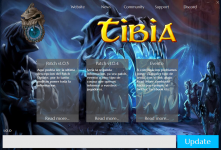
Tibia Launcher v2.0 All Versions ( Tibia Client / OtClient / Otcv8 Client ) - Tibia Launcher v2.0 All Versions ( Tibia Client / OtClient / Otcv8 Client )
4.png

Hola a todos,

Hoy tengo el placer de anunciarles el Tibia Launcher compatible para Tibia ( Tibia Client / OtClient / Otcv8 Client incluso otros que hubieran ustedes mismo creado ) en todas sus versiones, ejecutando correctamente el .exe del cliente directo , ya sea en version 6-10x o en versiones 10-12x+ por venir desde la carpeta bin/ o de cualquier otra carpeta.

Informacion sobre el contenido:
  • Incluye un archivo .PDF de como instalar / compilar
  • Incluye todos...

Leer más sobre esta descarga pulsando aquí ...
 
Última edición:
Alex

Administrador
Dev
Registrado
1 Sep 2021
Mensajes
2.362
Puntuación de reacción
28.640
Puntos
707
S

Sasketoon

Invitado
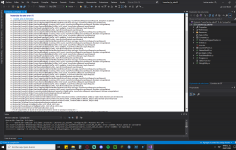
hola alex, al momento de querer abrir Constants.cs en el visual 2019 me marca error.

error visual 2019.png

y al querer compilar me lo marca como incorrecto.

Me podrias decir en que estoy mal o que me falta.

Baje visual 2019 con toda la paq c++ y .Net 481

el codigo es este:

using System.IO;

namespace Launcher
{
class Constants : Application
{

/// <summary>
/// Core game info
/// </summary>
public static readonly string GAME_TITLE = "Octebra";
public static readonly string LAUNCHER_NAME = "Octebra Launcher";

/// <summary>
/// Paths & urls
/// </summary>
public static readonly string DESTINATION_PATH = System.AppDomain.CurrentDomain.BaseDirectory;
public static readonly string ZIP_PATH = Path.Combine(DESTINATION_PATH, GAME_TITLE + ".zip");
public static readonly string GAME_EXECUTABLE_PATH = Path.Combine("bin\\client.exe");

public static readonly string VERSION_URL = "https://127.0.0.1/Updates/version.txt";
public static readonly string APPLICATION_ICON_URL = "https://127.0.0.1/webimages/favicon.ico"; // Needs to be .ico
public static readonly string LOGO_URL = "https://127.0.0.1/webimages/logo.png; // Updated 300 x 200 max formats: PNG / JPG / GIF
public static readonly string IMAGE_URL = "https://127.0.0.1/webimages/img_url.png"; // Title Banner 580x150 max, formats, PNG/JPG/GIF
public static readonly string BACKGROUND_URL = "https://127.0.0.1/webimages/background.jpg";
public static readonly string PATCH_NOTES_URL = "https://127.0.0.1/Updates/updates.xml";
public static readonly string CLIENT_DOWNLOAD_URL = "https://127.0.0.1/Updates/update0000001.zip";

/// <summary>
/// Navigation bar buttons
/// </summary>
public static readonly string NAVBAR_BUTTON_1_TEXT = "Lastest News";
public static readonly string NAVBAR_BUTTON_1_URL = "http://127.0.0.1/?subtopic=latestnews";
public static readonly string NAVBAR_BUTTON_2_TEXT = "Information";
public static readonly string NAVBAR_BUTTON_2_URL = "http://127.0.0.1/?subtopic=serverinfo";
public static readonly string NAVBAR_BUTTON_3_TEXT = "Create Account";
public static readonly string NAVBAR_BUTTON_3_URL = "http://127.0.0.1/?subtopic=createaccount";
public static readonly string NAVBAR_BUTTON_4_TEXT = "Get Coins";
public static readonly string NAVBAR_BUTTON_4_URL = "http://127.0.0.1/?subtopic=accountmanagement&action=donate";
public static readonly string NAVBAR_BUTTON_5_TEXT = "Discord";
public static readonly string NAVBAR_BUTTON_5_URL = "https://discord.gg/zb6yXUejCF";

// Modify this array if you're adding or removing a button
public static readonly string[] NAVBAR_BUTTON_TEXT_ARRAY = {NAVBAR_BUTTON_1_TEXT, NAVBAR_BUTTON_2_TEXT, NAVBAR_BUTTON_3_TEXT,
NAVBAR_BUTTON_4_TEXT, NAVBAR_BUTTON_5_TEXT };

/// <summary>
/// Settings
/// </summary>
public static bool SHOW_VERSION_TEXT = true;
public static bool AUTOMATICALLY_BEGIN_UPDATING = false;
public static bool AUTOMATICALLY_LAUNCH_GAME_AFTER_UPDATING = false;
public static bool SHOW_ERROR_BOX_IF_PATCH_NOTES_DOWNLOAD_FAILS = true;

}

Gracias por la atencion bro
 

Alex

Administrador
Dev
Registrado
1 Sep 2021
Mensajes
2.362
Puntuación de reacción
28.640
Puntos
707
hola alex, al momento de querer abrir Constants.cs en el visual 2019 me marca error.

Ver archivo adjunto 3932

y al querer compilar me lo marca como incorrecto.

Me podrias decir en que estoy mal o que me falta.

Baje visual 2019 con toda la paq c++ y .Net 481

el codigo es este:


Gracias por la atencion bro
Hola,
Una launcher , aunque para mí sea lógico , pero debería de integrar la información es algo que carga imágenes en línea , en línea significa con internet. También no accepta ip con números sino que url texto únicamente, corrigiendo esto te funcionara y no te marcará error al abrir el launcher sino te marcará error que no puede obtener nada de imágenes y menos en local.


Para los errores no veo. Se necesita visual 2019, instalar c++ con .net framework en complementos. Después se necesita el net 3.1 y net 5.0 ( El 5 en teoría si jugáis a juegos normales lo tenéis ya instalado )
 

Alex

Administrador
Dev
Registrado
1 Sep 2021
Mensajes
2.362
Puntuación de reacción
28.640
Puntos
707
Este funciona para el Endless 13.11?
Si
Funciona sin problemas igual que este ,
 
shape1
shape2
shape3
shape4
shape5
shape6
Arriba